Your daily view
Deadline Board
Every dated obligation you have, from every tool, on one page, sorted by how soon it hurts.
What it collects
The Deadline Board does not hold deadlines of its own. It reads every dated obligation recorded anywhere in the software and puts them in one list. Nothing is entered here; things appear here because they were entered somewhere they belong.
| Source | What arrives |
|---|---|
| Grants & Funding | Application deadlines, reporting dates, renewal dates. |
| Compliance | Registrations, filings, policy reviews, insurance renewals. |
| Finance | Fiscal year ends, audit dates, budget approvals. |
| Contracts | Expiry and renewal dates. |
| Governance | Meetings, term ends, acknowledgment due dates. |
| Programs | Program milestones and reporting periods. |
| Donor cultivation | A planned move with a date is a commitment to contact somebody by then. |
| Operations and Org Profile | Everything else with a date attached. |
Health, not just dates
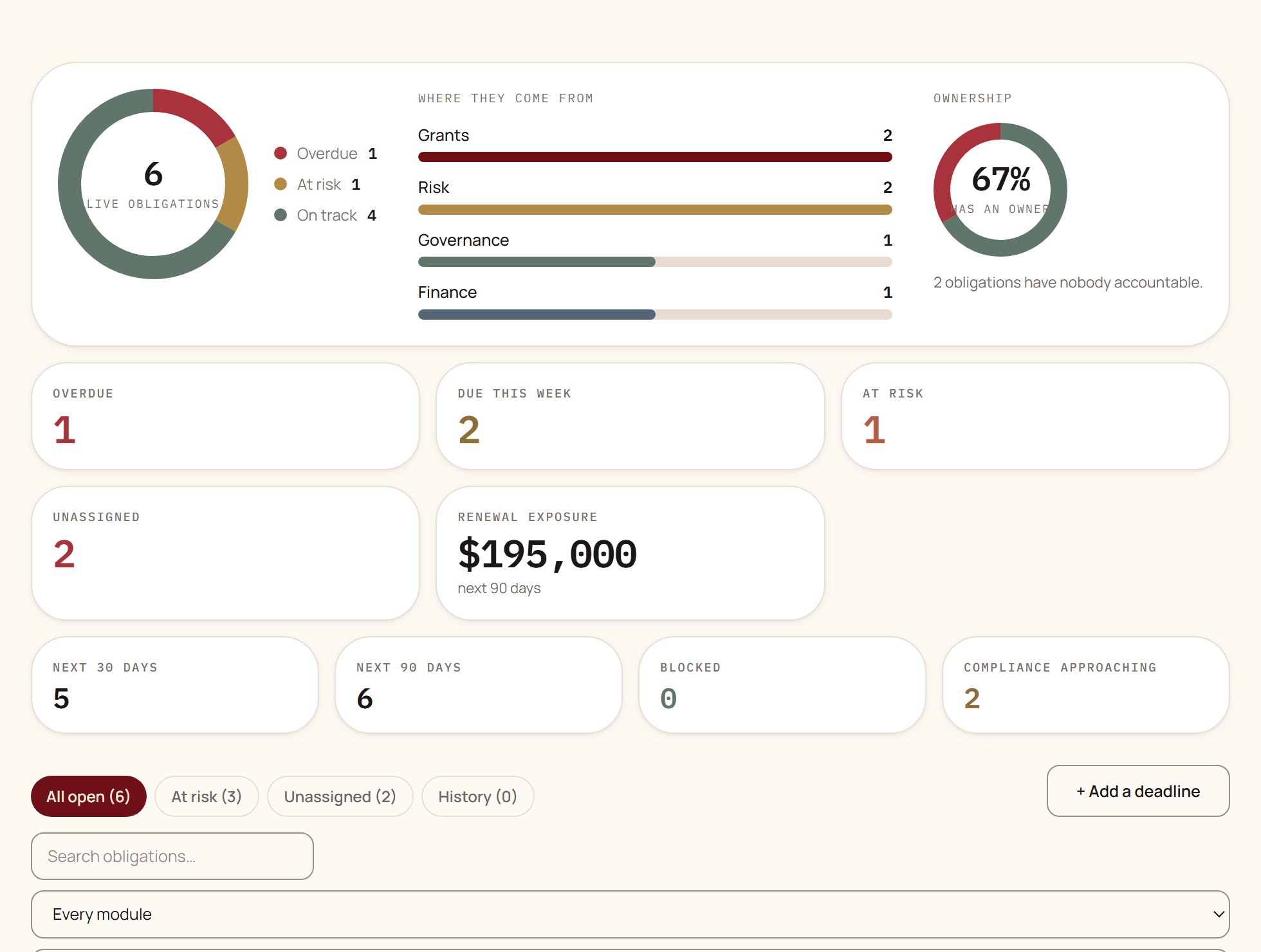
Every live obligation carries a health, and health is not the same thing as how far away the date is. Something due in two months with no owner and three unmet requirements is in worse shape than something due next week that is ready to file.
| Health | Means |
|---|---|
| On track | Nothing is wrong with it. |
| Watch | Something is worth an eye on: the date is approaching, or a requirement is outstanding. |
| At risk | It will probably not be met without somebody doing something. |
| Critical | The date is close and the consequences of missing it are serious. |
| Overdue | The date has passed and it is not closed. |
Anything flagged shows why underneath it, in a sentence rather than a code. Nobody should have to guess what put an item on the list.
The four views
| Tab | Shows |
|---|---|
| All open | Every live obligation, whatever its health. |
| At risk | Only the ones that need somebody to act: at risk, critical, and overdue. |
| Unassigned | Live obligations with nobody accountable. This is the one to clear first. |
| History | Everything closed, with how it ended. |
Above the tabs is a summary: how many are overdue, due this week, at risk, and unassigned, plus the money attached to anything renewing in the next ninety days and how many compliance obligations are approaching. The charts beside it break the same set down by health and by which tool the obligation came from.
Using it
A ten minute weekly pass is what makes this page work.
Open
Unassignedand give every obligation an owner.This is the cheapest ten minutes in the software. Everything else on this page depends on somebody being responsible.
Open
At riskand read the reason under each item.The reason tells you whether it needs a decision, a document, or just somebody to start.
Clear anything overdue: close what is actually done, and give a new date to what genuinely slipped.
An overdue list nobody prunes stops being read within about a month.
Check the ones due soon have an action behind them in the Action Center.
A deadline with no action behind it is a date, not a plan.
Read next
- Action CenterWhere a finding becomes somebody's job: tasks, owners, priorities, projects, subtasks, and where the work came from.
- Risk & Compliance CenterA register of what could go wrong, a calendar of what must be filed, a library of your policies, and a record of incidents when something does happen.
Something here wrong, missing, or out of date? Email support@fundwisr.ai and tell us which chapter. Documentation defects are treated as defects.