Your daily view
Start here
The setup checklist that reads your real records, shows what each thing you enter turns on, and always names one next step.
What this page is
Start here is the answer to "what do I put in, and where does it go". It lists what FundWisr needs, in the order that turns on the most, and tells you what each entry feeds once it is in.
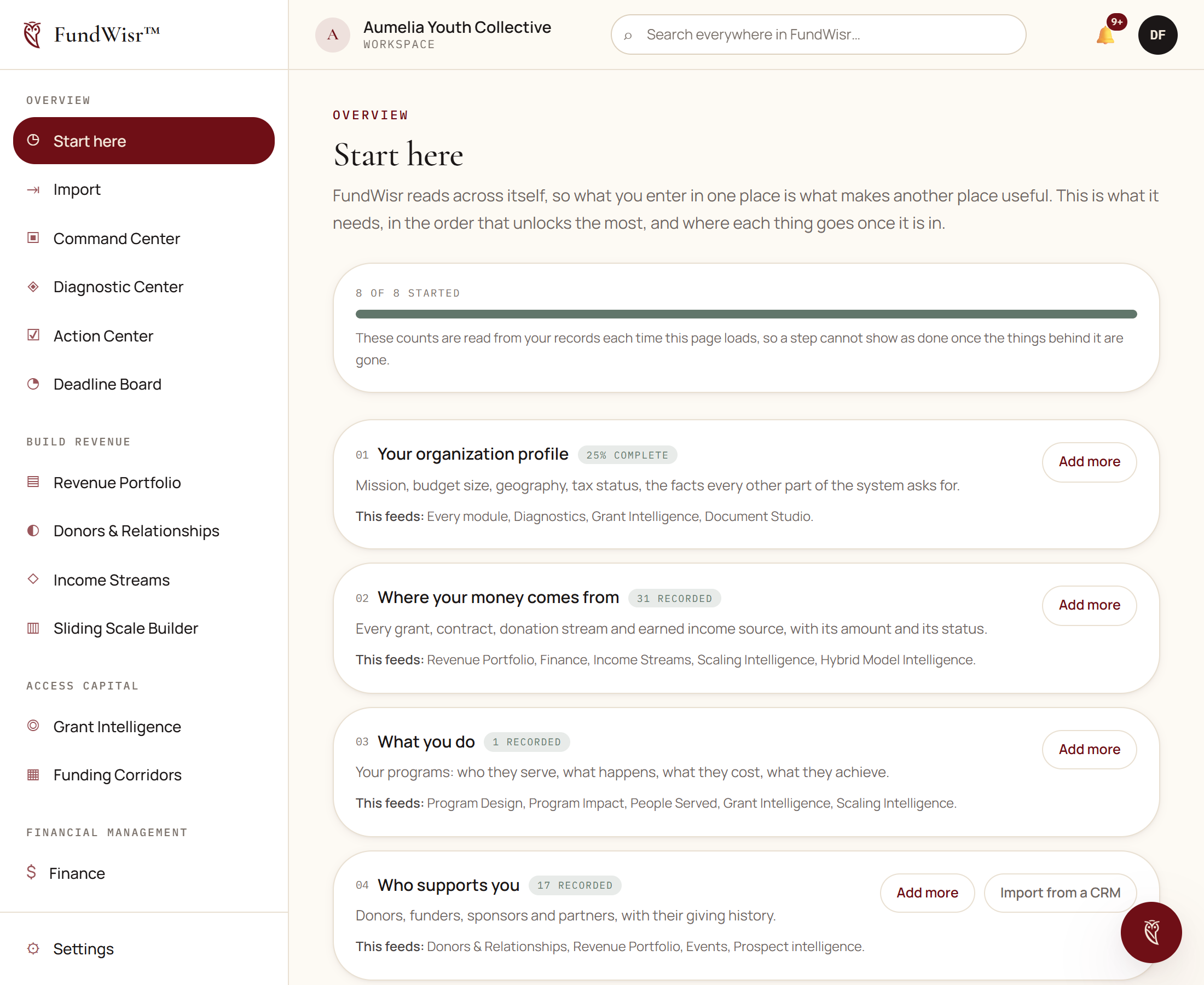
How to work through it
Follow the
Next:link at the top right.It always points at the first step with nothing behind it, so you never have to decide what to do next.
Read the This feeds line before you decide a step is not worth doing.
It names the tools that stay guesswork until that step has records. Several steps turn on more than you would expect.
Use the second button on a row when there is one.
Where a step can be imported in bulk rather than typed one at a time, the row offers both.
This page is never locked
Start here is available on every plan, including Foundation, and to every role. A page whose job is to tell you what to enter cannot itself sit behind having entered it. The destinations it links to still enforce your plan, so an item you cannot open yet will say so when you get there.
Read next
- Bringing your records inGetting donors, giving history, properties, and documents in from a spreadsheet or another system without creating a second copy of everybody.
- Your organization profileThe record every other tool reads from, why filling it in is the highest-value hour you will spend, and what each part of it unlocks.
Something here wrong, missing, or out of date? Email support@fundwisr.ai and tell us which chapter. Documentation defects are treated as defects.